How your photos should look for a secure status card
How to submit acceptable photos when applying for a secure status card.
SCIS Photo App
You can now take your own photo cost-free any time you're applying for a secure status card and submit it straight from your smart phone using the SCIS Photo App, including when you're applying for:
- registration and the secure status card at the same time, if you're not already registered
- a secure status card (first-time, renewal or replacement), after you're already registered
On this page
Acceptable photos
Photos can be in colour or black and white and be taken by anyone.
Photos need to:
- be clear, sharp and in focus
- be taken with a neutral facial expression, that is, eyes open and clearly visible, mouth closed
- be taken with uniform lighting, without shadows, glare or flash reflections
- be taken straight on, with face and shoulders centered and squared to the camera
- be taken in front of a plain white or light-coloured background, with a clear difference between the face and the background
- represent natural skin tones
- be originals and not taken from an existing photo
- be taken within no more than 12 months before the date you submit the application and reflect applicant's current appearance
Attention
- Prescription eyeglasses may be worn as long as the eyes are clearly visible and there is no reflection or glare on the eyeglasses.
- Sunglasses and tinted eyeglasses are unacceptable.
- Photos with the red-eye effect or red-eye alterations are unacceptable.
- Head coverings are unacceptable, unless worn for religious, cultural or medical purposes:
- the full face needs to be clearly visible and the head covering shouldn't cast any shadows on the face.
- Hair can be worn down.
Child photos
For child photos, the same requirements apply.
In addition:
- photos need to show the child's head and shoulders only
- parent's or child's hands shouldn't appear in the photo
For newborns, the photo may be taken while the child is sitting in a car seat, as long as a white blanket is placed over the seat behind the child's head.
- Shadows shouldn't appear across the face or shoulders, around the ears or in the background.
- Minor variations in a neutral expression of a newborn are recognized.
Ways to get your photos taken
Attention
We are aware of an issue affecting some users of the Apple (iOS) Public SCIS Photo App and are working to resolve it as quickly as possible. The issue does not affect Android users.
If you are experiencing difficulties submitting a photo please contact your nearest Indigenous Services Canada regional office to learn about alternative photo submission options available in your area. Find your nearest regional office: Regional offices
We apologize for the inconvenience and thank you for your patience.
You can take your photo cost-free:
or
- in person at
- a regional office
- a First Nations office, if applicable
- any trusted source
You can also pay a service provider to take Canadian passport-style photos.
How to submit your photos
If submitting printed photos with your application
Provide 2 identical and unaltered Canadian passport-style photos that meet these specifications:
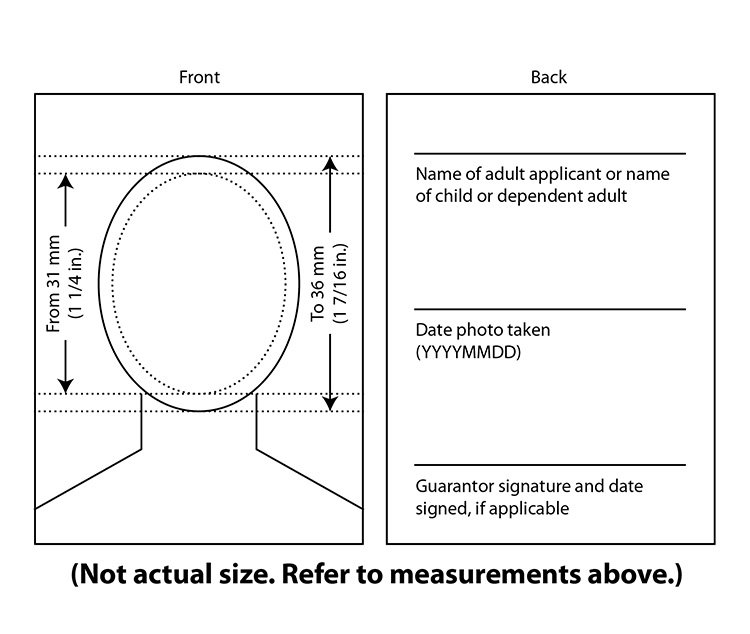
- 50 mm wide x 70 mm high (2 inches wide x 2 3/4 inches high) in size
- length of the face need to be between 31 mm (1 1/4 inches) and 36 mm (1 7/16 inches) from chin to natural top of head
- printed on plain, high-quality photographic paper
Provide on the back of one of the photos:
- the full name of the person in the photo
- the date the photo was taken, not the date the photo was printed
- the guarantor's signature and date signed, if applicable
If submitting a photo using the SCIS Photo App
The SCIS Photo App can only be used to submit photos cost-free when applying for any type of secure status card (at the same time as registration, first-time, replacement or renewal). It can't be used to submit photos to apply for a status card. You can submit a digital photo straight from your smartphone using the SCIS Photo App:
- Visit Google Play or the App Store to download the app free of charge
- Follow the on-screen instructions
- If you need a guarantor, be sure that person is present when you take your photo
Privacy in the SCIS Photo App
No personal information is stored in the app. Collection, use and disclosure of personal information are in accordance with the Privacy Act.
Review the SCIS Photo App privacy notice in the app for any other questions.